STUDENT NOVA
Your own way
to an “I get it”.
Explore your GCSE subjects, try a starter question and see what to revisit. Build confidence one small step at a time.
Find your starting point ↗
 Nova Online
GCSE learning, teaching and school life.
Together in one
connected workspace.
 TeacherNova
Discover Teacher Nova
Organisation Nova
TeacherNova
Discover Teacher Nova
Organisation Nova
Students, staff and school life.
A clearer view. A connected
day.
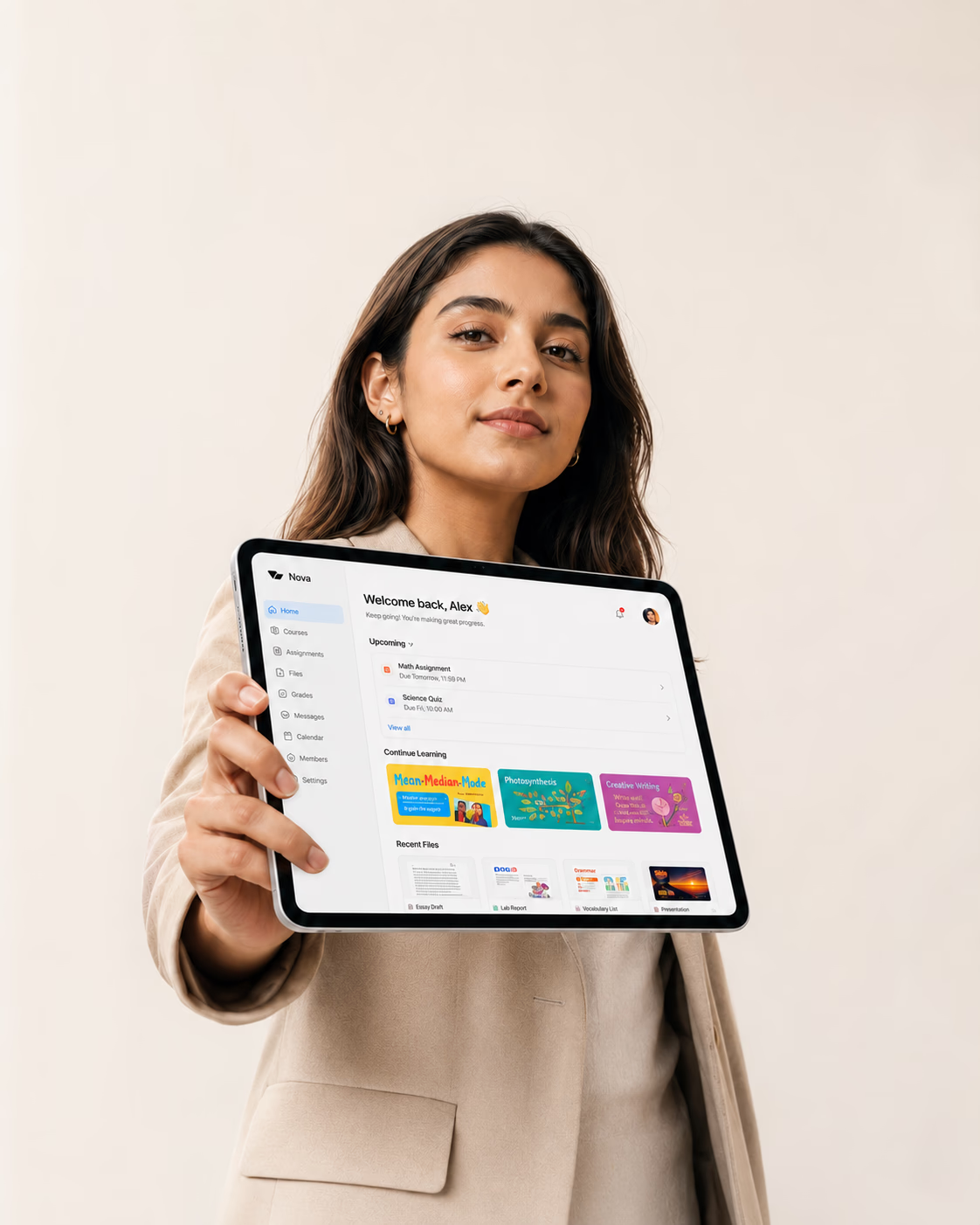 Discover Student Nova
Independent GCSE learning. Teachers with every learner in view. One organisation workspace for your people and records.
GCSE learning with AQA & Pearson Edexcel topic guides, connected teaching and school organisation. Discover what each workspace offers.
Bring Nova to your school ↗
NOVA CENTRE
In-person teaching, thoughtful explanations and room to ask the question.
Discover Nova Centre ↗Explore Nova for schools ↗YOUR NEXT CHAPTER
A little curiosity goes a long way.
Find your next session at Nova Centre.
ROOM TO BE CURIOUS
STUDENT NOVA
Explore your GCSE subjects, try a starter question and see what to revisit. Build confidence one small step at a time.
Find your starting point ↗TEACHER NOVA
Bring class lists, attendance and saved learning activity together. Make space for the moments that need a teacher.
Explore your teaching day ↗ORGANISATION NOVA
Connect students, staff, private records and finance. See the school day clearly, with access shaped around each role.
Explore your school workspace ↗PLAN YOUR GCSE REVISION
A clear route through your subjects, with room to learn at your own pace.
Take a look inside Student Nova ↗Choose AQA or Pearson Edexcel, your subjects and your study days.
Use starter practice and confidence reflections to decide what to revisit.
Open your board’s resources, try a question and learn from the mark scheme.
A NEW PERSPECTIVE
Sometimes, all it takes is a different way in.
ROOM TO GROW
A familiar classroom. A fresh start. Discover what a little support can make possible.
LEARNING & RESEARCH
Thoughtfully designed technology can give learners more ways to practise, receive feedback and express what they understand. Here is some of the research informing our approach.
UK HIGHER EDUCATION · 2025
Of 15,398 respondents in Jisc’s 2024/25 survey, 86% rated their digital learning environment above average.
Student experience across 30 providers. These ratings describe perceptions of digital learning.
Read the Jisc findingsHARVARD PHYSICS · 2025
A randomised trial involving 194 undergraduates found higher learning gains with a carefully structured AI tutor than with in-class active learning.
Two physics lessons in one university course. The result does not establish GCSE or Nova outcomes.
Read the published studyHANDWRITING & DIGITAL TOOLS
Handwriting with a stylus keeps diagrams, annotations and written working part of a digital study routine.
Research finds differences in brain activity between handwriting and typing. Effects on learning performance remain mixed.
Explore the handwriting researchTHE NOVA LEARNING NOTES
Four short reads on technology, teaching and the ways we learn.
Updated 23 September 2026
Technology can make high-quality learning support more available, more responsive and easier to revisit. A learner can return to an explanation, annotate a diagram or receive guidance while an idea is still taking shape. By September 2026, research offers an increasingly informative account of where these benefits arise: purposeful practice, useful feedback, accessible teaching and well-supported educators. The strongest educational case connects these capabilities to the work of learning itself.
A useful way to understand educational technology is through the opportunities it creates for interaction. Written working gives a teacher something to discuss. A saved question identifies a point of uncertainty. A sequence of attempts can show how an explanation has been understood. Our interpretation is that digital tools are especially valuable when they help learners articulate their thinking and help teachers choose an appropriate next step.
Kestin and colleagues’ university trial suggests that carefully designed tutoring can support understanding through questions, feedback and a manageable sequence of steps. Its short duration and specific subject setting matter when interpreting the findings.1 For Nova, this informs a design aim: connect independent practice with a teacher’s knowledge of each learner. The research is external to Nova; our own learning impact remains to be evaluated.
In an EEG study of 36 university students, van der Weel and van der Meer found more extensive brain connectivity during digital-pen handwriting than typing. Participants used a Microsoft Surface Studio, so this was not an iPad trial or a test of attainment.2 A separate 2026 study comparing ink pens, digital pens and keyboards found no significant difference in immediate test performance.3
Our interpretation is to preserve a choice of writing, drawing and typing. An iPad with Apple Pencil can support handwritten notes and annotation in compatible apps.4 This offers a practical way to keep handwriting in digital study, while allowing the task, the learner and the teaching approach to guide the choice of device.
Maryville University’s Digital World programme provides an iPad to all traditional, full-time undergraduates, illustrating how devices can be integrated into everyday study.5 Jisc’s survey shows positive student perceptions, alongside continuing needs for reliable connectivity and suitable devices.6 Access and teaching support deserve the same attention as the technology itself.
A study published in Nature on 9 September 2026 reports learning gains from phone-based tutoring across five randomised trials during school disruption. It offers a timely example of technology extending access to personal instruction, even through familiar, relatively simple devices.8 The practical significance is the connection it makes possible: a learner, a suitable task and someone who can respond.
In England, the DfE and EEF launched an EdTech Testbed in May 2026 to strengthen the evidence available to schools, including for generative AI products. The EEF’s programme also examines adaptive learning, feedback and teacher workload.9 This makes careful evaluation part of a positive route to adoption: schools can identify the teaching needs a tool serves and review how well it serves them in practice.
These findings support a constructive ambition for digital education: more opportunities to practise, more continuity between sessions and more useful information for teachers. For Nova, they inform the design of connected learning records, revision routines and teacher oversight. Our own impact will be assessed with the schools and learners using Nova. The following notes explore feedback, digital handwriting and teaching support in more detail.
Digital learning creates an opportunity to offer support at the moment a learner needs it. The educational benefit comes from what happens next: noticing a misconception, trying a different approach and explaining why it works.
The EEF’s evidence synthesis finds positive effects from feedback delivered by teachers, peers and digital systems. Helpful feedback makes the task or strategy clearer and gives the learner information they can use to improve. Its value depends on both its quality and the opportunity to act on it.1 A digital explanation can make this sequence easier to revisit, allowing a learner to pause and work through one step at a time.
Kestin and colleagues’ 2025 Harvard study compared a structured AI tutor with active classroom teaching across two undergraduate physics lessons. The tutoring condition produced higher learning gains. The intervention was deliberately designed around learning principles, including manageable steps and feedback.2 The finding supports further study of this approach in other settings; it does not establish the same effect for GCSE pupils.
Repeated questions can offer a productive starting point for a lesson. A teacher might ask a pupil to show where their method changed, or use a shared difficulty to plan a short explanation for the class. Our design aim for Nova is to make that conversation easier through useful learning records and clear next steps.
A digital classroom can retain the familiar acts of writing, sketching and working something out. A stylus gives learners a way to show a calculation, connect ideas in a diagram and annotate a text while keeping their work available to revisit.
A 2024 EEG study with 36 university students found more extensive connectivity during digital-pen handwriting than typing. It examined neural activity using a Microsoft Surface Studio, rather than measuring exam gains.1 This offers a reason to take the physical process of writing seriously within a digital learning environment.
Shin and colleagues’ April 2026 study compared ink pens, digital pens and keyboards in note-taking tasks with 33 undergraduates. Brain-activity measures differed by device and strategy, while immediate test scores did not differ significantly.2 Our interpretation is to give learners purposeful choices: sketch a process, write a question in their own words or type a structured summary, according to the task.
Apple’s iPad documentation describes handwriting and drawing in Markup with a finger or a compatible Apple Pencil.3 These capabilities allow a teacher to plan activities that combine a digital resource with visible written reasoning. Device features provide the medium; the activity determines how learners use it.
Some of technology’s most practical educational benefits are found around the lesson: preparing a useful example, maintaining contact with a learner and making resources easier to access. Research offers encouraging examples of each, with implications for how schools support their staff.
An EEF-funded trial, evaluated by NFER and published in December 2024, involved 259 teachers across 68 English secondary schools. Teachers using ChatGPT with an implementation guide spent an average of 56.2 minutes per week on the measured Year 7 and 8 science preparation tasks, compared with 81.5 minutes in the comparison group: a 31% reduction. A blinded review of sampled resources found no apparent reduction in quality.1
This was a saving within the preparation activities studied, rather than a reduction in teachers’ total working week. It suggests a practical opportunity to support resource creation while teachers retain responsibility for checking accuracy, adapting examples and deciding what their pupils need.
Angrist and colleagues’ Nature paper, published on 9 September 2026, reports five randomised trials in India, Kenya, Nepal, the Philippines and Uganda. Targeted tutoring by telephone improved learning during school disruption; text-message-only approaches had mixed results.2 The study concerns emergency education and foundational learning. Its wider relevance is the potential of accessible technology to sustain a teaching relationship.
Jisc’s 2024/25 higher education survey recorded positive digital experiences alongside continuing needs for suitable devices and reliable connectivity.3 For schools, our interpretation is to plan access and teaching together. Clear instructions, readable materials and a familiar route to asking for help can make a digital resource easier to use consistently.
Nova Learning Notes connect published research with practical teaching ideas. They are editorial commentaries; the studies cited evaluate their own settings and programmes.
GET TO KNOW NOVA
Choose a starting point for a conversation with Nova. This form creates a brief on your device; it does not submit your information.
This release is designed for a supervised school pilot. A school should confirm its account setup, curriculum coverage, privacy arrangements, support and accessibility needs before onboarding pupils.
AQA and Pearson Edexcel topic maps for maths, English language, English literature, biology, chemistry, physics and combined science. AQA combined science uses Trilogy (8464); Edexcel English language uses 1EN0. This is not an International GCSE, WJEC or CCEA course. Check your exact qualification with your teacher.
Not yet. The pilot has six original maths starter lessons with worked examples and practice checks. Other topics include study guides, notes, confidence tracking and links to the official specification. Your teacher’s materials remain part of the learning experience.
Students access their own learning. Teachers access educational rosters, attendance and learning progress within their school. Organisation roles control private records, with additional permissions for finances and account administration.